
Loop engineering is a term barely six weeks old, but if you’re building anything with an AI agent right now, it’s worth understanding properly rather than skimming past as another piece of jargon. Here’s what it actually means, what Verse8 and Roblox are already doing with it in production, and where you still need to stay sharp yourself.
What loop engineering actually means
Here’s the shift, in Peter Steinberger’s words: stop prompting your coding agents, start designing loops that prompt them for you. Boris Cherny, who runs Claude Code at Anthropic, describes his own workflow the same way these days, he’s writing loops instead of typing instructions directly into the model. Worth remembering this is brand new as a named idea, it caught on in June, so don’t feel behind if you haven’t built one yet. Almost nobody has.
Strip away the terminology and it comes down to six things, easier to recognize against an actual bug than as an abstraction. Say enemies in your fighting game have stopped taking damage.
| Part | In this bug |
|---|---|
| Intent | What “done” looks like. Attacks deal damage again, plainly enough that you can check it without reading code. |
| Context | Whatever the loop needs before it touches anything. Here, the attack’s hitbox and the enemy’s hurtbox, the two shapes that are supposed to overlap when a hit lands. |
| Action | The actual attempt. A small, reversible edit, expanding the hitbox rather than rewriting your whole combat system. |
| Observation | The check that follows. Does damage land now, yes or no, read off an actual test run instead of guessed at. |
| Adjustment | What happens on a no. Nudge the hitbox’s alignment and try again. |
| Stopping condition | The gate that decides whether to run again. Damage registering cleanly on the test run, not another guess dressed up as progress. |
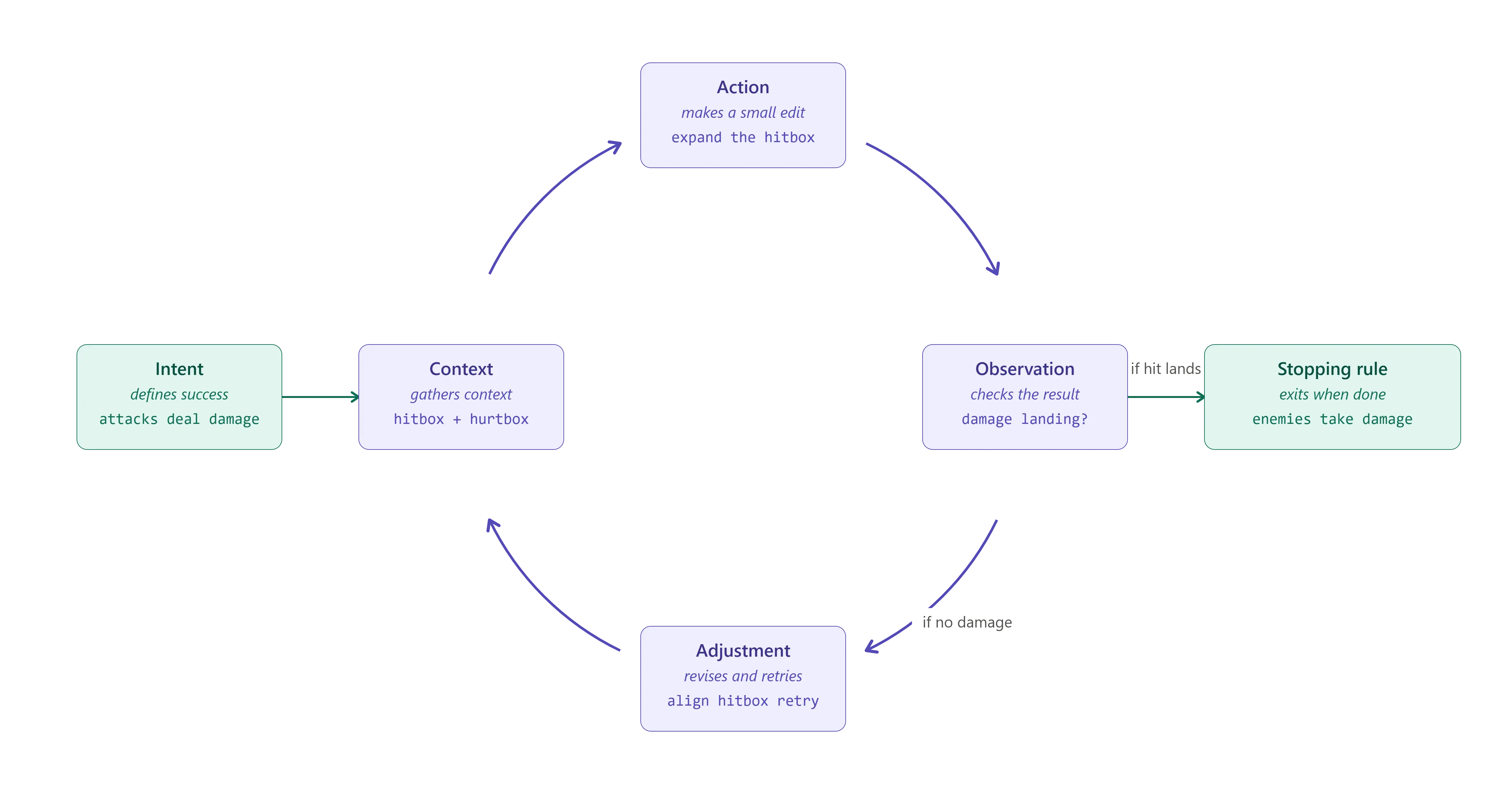
The stopping condition is the piece most people skip, and it’s the one that actually matters. Without one, you’re not debugging anymore, you’re thrashing, burning compute on a wrong assumption instead of surfacing it. Build the exit condition before you build the loop, not after.
Why this matters more in games than almost anywhere else
Most software fails at generation time, in ways a compiler or linter catches before you ever hit run. Games fail at runtime, in ways that only show up once something is actually moving on screen. Physics that behave until a specific collision angle. An asset that loads fine thirty-nine times and chokes on the fortieth. A multiplayer state that stays in sync until two players do something you never tested for. None of that is visible to a model reading its own generated code. It’s only visible to something watching the thing run, which is exactly what the observation stage is for.
That’s why games are turning into one of the better proving grounds for this whole approach.
Debugging is just the easiest loop to build first
Don’t mistake what you’re about to read for the whole idea. Nothing about loop engineering is actually scoped to debugging. The same six parts work for any agentic process you want running unattended. A content loop can draft dialogue or a quest chain, check it against your style guide, revise, repeat. A balance loop can run simulated playtests against a weapon or a difficulty curve, check whether it lands right, adjust the numbers, repeat. Neither has anything to do with a crash log.
Debugging is just where the pattern is most mature right now, for a specific, practical reason worth remembering when you’re deciding what to automate first yourself: it has an unambiguous success signal. Code either throws an error or it doesn’t. That clean pass or fail is what makes the observation step easy to build. Whether a quest is interesting or a weapon is balanced doesn’t have that same clean check, so those loops are harder to build and you’ll see fewer examples of them out in the wild. That’s a gap in maturity, not a gap in what the term covers, and it’s probably where you’ll find the most room to build something before everyone else catches up.
Verse8 runs this in production
Somewhere on Verse8 right now, a creator with zero coding background is typing a prompt for a game that doesn’t exist yet. It generates. It breaks, because things generated in seconds tend to. And then nothing happens. No error lands in anyone’s lap, no ticket gets filed. The code just gets quietly rewritten and redeployed, and the creator never finds out there was anything to fix. That’s a loop doing its job. It’s also a good one to study if you’re thinking about building your own.
Agent8, Verse8’s core engine, generates the game code, runs it in a sandbox, captures whatever error comes back, and feeds that log to the model for a rewrite, on repeat, without a human debugging step in the middle. Verse8 calls this “invisible engineering.” That’s their own language for it, but in this case it’s a fair description of what’s actually happening, not just a nice phrase.
Roblox runs the same loop under a different name
Roblox’s Studio Assistant runs the identical cycle. Roblox calls it agentic loops, a playtest subagent that spawns a character, runs it through the game, reads the logs, and folds the result back into the next attempt. Same six parts as Verse8’s, just with a live playtest standing in for the sandbox at the observation step.
If you want to know what this actually feels like to build with, go read the people who’ve done it rather than the company’s own writeup. Josh English gave Codex CLI, connected to Roblox Studio through the same kind of MCP bridge, one instruction: build a ten-stage procedural obstacle course, complete with moving hazards, health pickups, a leaderboard, and score persistence, then keep fixing itself until the whole thing actually worked. He describes the resulting loop as one continuous pass, inspection, implementation, runtime observation, debugging, refinement, with his own job shrinking down to framing the problem and judging whether the result is any good.
Where you still need to stay sharp
Andy G. built a full Roblox mining-tycoon game through Claude Code and MCP, and along the way hit a bug where respawned blocks turned permanently white, invisible through the MCP tooling in real time, the same invisibility Verse8 sells as the whole feature, working against him here instead of for him. It took him forty-five minutes to track down something he could’ve spotted in five just by watching the screen directly. That’s the trade you’re making the moment you stop watching your own game run: the loop is supposed to catch exactly this kind of problem, and here it didn’t.
That’s one way a loop can fail you, the mechanism itself misses something. There’s a second way that has nothing to do with the mechanism working correctly, and it’s the one to keep in the back of your mind no matter how good your tooling gets. A loop can pass every check it has and still hand you a broken game, in the sense that actually matters, whether a player has fun. A sandbox run succeeding doesn’t mean your level design is good. You can have a debugging loop with a perfect track record and still ship something fully functional and completely unfun.
Keep that split in mind as you build one of these yourself: trust the loop to catch what it’s built to catch, and don’t quietly hand it the one job it was never built for, deciding whether your game is actually good. Fixing your code faster was never the same project as making your game better.
Sources
- CodeRabbit, “What is Loop engineering?”
- Kilo, “What Is Loop Engineering? AI Feedback Loops”
- MindStudio, “What Is Loop Engineering? The New Meta for AI Coding Agents”
- Google Cloud, Verse8 case study
- Roblox, “Roblox Studio is Going Agentic”
- Andy G. on Medium, “I Built a Roblox Game Using Only AI Agents — Here’s What Happened”
- Josh English on Medium, “Advanced Agentic Game Development in Roblox with MCP”